
A digital form that only collects information is no longer enough. In complex business environments, where several teams are involved in the same process, what really makes the difference is having an collaborative and smart form.
Production, quality, maintenance and logistics processes, among others, often involve multiple actors: plant operators, quality managers, maintenance managers, supervisors, external suppliers… And often, coordination between them becomes a real bottleneck.
Therefore, a basic digital form system is no longer sufficient. What is needed is an intelligent and collaborative form that acts as a hub to connect teams and operational stages.
When forms are designed to be an active part of the workflow, and not just an isolated step, they become powerful tools for efficiency and coordination.
What makes a form intelligent?
A smart form goes beyond mere data capture. Also:
- Adapts its content according to the user or the context
- Automates downstream tasks (shipments, notifications, approvals)
- Integrates with other systems (ERP, CRM, CMMS, WMS, YMS…)
- Validates information in real time
- Ensures traceability of each interaction
But, if we add collaboration to all these functionalities, the value of intelligent forms multiplies.
What does it mean for a smart form to be collaborative?
As we discussed in the post From island to continent: centralize information and keep your team connected with smart forms software, smart forms software digitizes and centralizes all data collection in the field, connecting all teams from the field to the office, and eliminates islands of information that fragment processes. However, this connectivity is not enough if it is not built on collaboration.
For an intelligent form to be collaborative, it must incorporate functionalities that allow the orderly and coordinated participation of multiple users throughout the process. Some of these functionalities are:
- Definition of roles and permissions
- Internal comments or annotations, within the form itself.
- Approval flows or review paths
- Automatic notifications
- Version history and change traceability
- Automatic triggered actions
- Possibility of partial or collaborative editing at different times
These features turn the form from a mere data container into a decision convergence point and an active part of the operational process.
What happens when smart forms are not collaborative?
In contrast, when collaboration is not the basis of an online forms software, agility, control and quality are lost. And, moreover, when collaboration is not the basis of an online forms software, agility, control and quality are lost:
- Work in silos
- Manual repetition of tasks
- The information is quickly outdated
- Approvals are delayed
- No visibility of the process
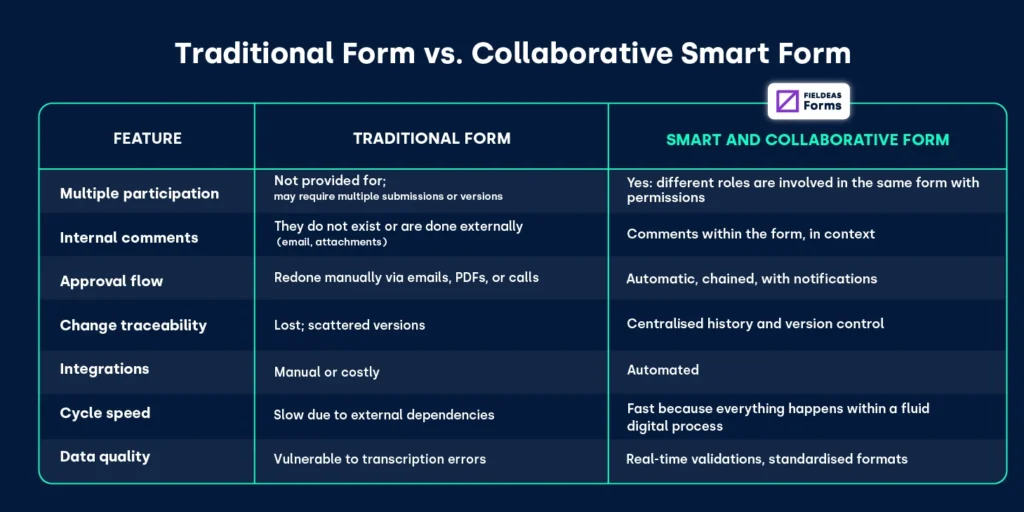
Applied example of a smart and collaborative FIELDEAS Forms form
Let’s take a practical example in an industrial plant where preventive maintenance and quality control is performed on critical machinery.
The traditional flow, without the collaborative component, would be:
- An operator performs maintenance and completes a paper checklist or a basic app.
- Send a PDF by mail to the quality technician.
- The technician prints, notes his observations and forwards it to the maintenance manager.
- If there is an anomaly, it generates a work order in the CMMS, sometimes manually.
- The plant manager reviews several documents before approving or escalating.
This flow is time consuming, error prone and generates friction between teams.
What preventive maintenance and quality control would look like with an intelligent and collaborative FIELDEAS Forms:
- The operator starts the form from his device. The form validates that he has completed all required tasks.
- Once completed, the form automatically activates the quality section.
- The quality technician reviews, adds observations and marks if there are critical findings. If so, the form is sent directly to the maintenance team.
- The maintenance engineer assesses the situation, estimates impact, attaches images and suggests corrective action.
- The plant manager receives a notification, reviews the summary and approves directly from the platform.
- All traceability is recorded. The data is integrated with the maintenance system and generates an automated order if necessary.
The same form is used to coordinate, document and activate actions, without leaving the platform.
Keys to implementing a collaborative smart form in enterprise environments
Beyond digitizing the data collection process, implementing a collaborative smart form brings multiple benefits that translate into efficiency and productivity.
Therefore, it is important to follow a number of key recommendations before choosing smart forms software:
Map the flows of your real operation
Do not adapt your operation to the form. It is the form that must adapt to your operation. Identify stages, roles, interdependencies and exceptions.
Define roles and permissions precisely
It prevents a role from being able to modify what does not belong to it. Accuracy is key to maintaining integrity.
Empower users with real-world examples
Uses real plant cases to train users. This reduces resistance to change and minimizes errors at the beginning of the process.
Start with critical or pilot processes
Don’t try to cover the entire operation from day one. Choose a maintenance or quality control process that already has friction.
Monitors and adjusts approval routes
Observe bottlenecks: if any stage suffers delays, adjust permissions, notifications or responsible parties.
Integrates with central systems
Connect the form to your ERP, maintenance system or MES, CMMS… so that data flows without manual intervention.
Measure results and communicate improvements
Closing time, number of rejects, reworks eliminated, etc. Showing improvements consolidates usage.
Lean on a mature solution
The choice of a smart digital forms solution should be based on key aspects such as interoperability, offline operation, encryption, use of digital signatures, real-time…
Read the post Why choose FIELDEAS Forms digital forms software? To learn more about these features.