Companies with field operations have an added handicap in achieving high levels of efficiency and competitiveness, as the digitization of processes is even more critical. In this context, electronic forms are a key part of improving data collection, reducing errors and speeding up decision making in environments where information flows directly from the field.
But, in addition, within the wide variety of digital forms solutions for companies, the no-code forms stand out, which are those that do not require programming knowledge to be used.
In this article we analyze why no-code electronic forms are a great ally for companies and how solutions such as FIELDEAS Forms can make a difference.
The challenge of data collection in operational environments
Companies with technicians in the field face very specific challenges:
- Processes still based on paper or poorly structured spreadsheets.
- Duplicity of tasks when recording data in the field and then transcribing it in the office.
- Human errors that affect the quality of the information.
- Lack of real-time visibility.
- Difficulty in standardizing procedures across teams and locations.
All of this has a direct impact on productivity, costs and responsiveness to incidents.
The good news is that today there are accessible, flexible and easy to implement solutions such as digital forms that allow overcoming these obstacles without the need for major technological developments.
What are no-code electronic forms?
Electronic forms are digital versions of traditional forms, designed to be completed from any device (mobile, tablet, computer…).
When we talk about no-code solutions, we are referring to platforms that allow you to create, modify and deploy forms without the need for programming. This means that the business teams themselves can adapt the processes to their real needs, without constantly depending on technical departments or external suppliers.
With solutions such as FIELDEAS Forms, creating a form is as simple as..:
- Define the necessary fields (text, numbers, lists, signatures, photos, geolocation…).
- Establish validation rules and workflows.
- Publish it and make it available to users in a matter of minutes.
Electronic forms as a lever for digital transformation
Adopting no-code digital forms is, in many cases, the first step towards deeper digitization. It enables companies:
- Standardize procedures.
- Measuring what was not measured before.
- Detect inefficiencies.
- Automate workflows.
- Build a data-driven culture.
In addition, by directly involving teams in the creation and improvement of forms, adoption is encouraged and resistance to change, one of the great challenges of any technology project, is reduced.
Advantages of no-code electronic forms for companies
The adoption of no-code digital forms brings tangible benefits from day one. And it does so by focusing on something key: ease of use for the end user, who does not need technical knowledge to work with the tool.
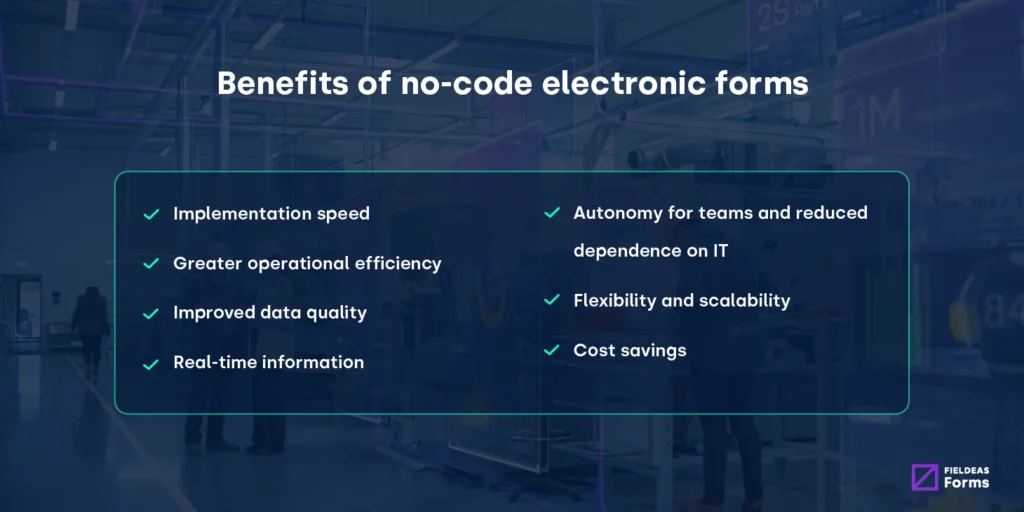
Thus, some of the main benefits of no-code electronic forms are:
1. Speed of implementation
While traditional developments can take weeks or months, no-code forms allow you to go from idea to action in a very short time. This makes it easier to respond quickly to operational changes, new regulations or market needs.
2. Increased operating efficiency
The information is collected only once, directly in the system. Manual transcription tasks are eliminated and administrative time is reduced.
More agility, fewer errors, better data and faster decisions translate into greater operational efficiency and better customer service.
3. Improved data quality
Electronic forms allow the application of automatic validations, mandatory fields and consistency checks, minimizing errors and omissions.
4. Real-time information
Decision-makers can access data instantly, facilitating fast, fact-based decision making.
5. Autonomy for the teams and less dependence on the IT area.
Technical departments are no longer a bottleneck for small improvements or adjustments to processes, as users can create and adapt forms without relying on IT developments.
This speeds up the implementation of new processes, reduces bottlenecks and empowers operational teams, who gain autonomy without relinquishing security or control.
6. Flexibility and scalability
Forms adapt easily to changes in processes, regulations or business needs, without long development cycles.
The no-code allows the forms to evolve at the same pace as the actual operation.
7. Cost savings
Less paper, less rework, fewer incidents. Digitization translates into a clear return on investment.
Use cases of no-code forms
Electronic forms have application in virtually every industry and department any sector and department. Some common examples include:
- Maintenance and technical services: work reports, inspections, safety checklist.
- Industry and factories: quality controls, production records, internal audits.
- Retail: store openings and closings, inventory control, incidents.
- Energy and utilities: installation reviews, incident reports, field measurements.
- Agriculture: crop monitoring, treatments, machinery control.
- Occupational risk prevention: assessments, incident reporting, training.
In all these scenarios, having an agile and standardized solution in place makes the difference between reacting on time or reacting late.
Why choose FIELDEAS Forms no-code forms?
Not all forms tools are the same. Many offer generic solutions that do not always fit the needs of complex operating environments.
FIELDEAS Forms was created precisely to meet the demands of companies with field operations, combining simplicity of use with functional power.
- Creation of forms without code, with an intuitive interface for business users based on the drag&drop system.
- Multi-device access, ideal for mobile devices.
- Online and offline operation, ensuring work continuity even when offline.
- Integration with other corporate systems, avoiding information silos.
- Centralized data management, with traceability and control.
- Scalability, to grow at the pace of the business.
The result is a solution that not only digitizes forms, but also transforms processes, putting technology at the service of the user and not the other way around.
Practical example: how to use an electronic no-code form
Let’s imagine an industrial maintenance company that wants to digitize its field intervention reports. Up to now, the technicians fill out paper sheets that are then transferred to the system, with delays and errors.
With FIELDEAS Forms, the process would be as follows:
Step 1. The person in charge creates the form with drag & drop
From the FIELDEAS Forms platform, the operations manager accesses the no-code editor and designs the “Intervention Report” form using a drag & drop system.
Simply drag the fields you need and drop them on the form:
- Technician data
- Date and time
- Customer and location
- Type of incident
- Description of work performed
- Before and after photos
- Customer’s signature
- Concluding remarks
Everything is configured through a visual and intuitive interface, without writing a single line of code and without relying on IT.
Step 2. Publish the form and assign it to your team.
Once created, the form is automatically published and available to field technicians, who can access it from a smartphone, tablet or laptop.
There is no need to install complex tools or perform additional development.
Step 3. The technician completes the form in the field
When the technician arrives at the intervention:
- Open the form from your device.
- Select the assigned service.
- Fill in the fields directly while performing the job.
- Attach photos from your cell phone camera.
- Collect the customer’s digital signature.
If there is no connection at that moment, the form works offline and synchronizes automatically when coverage is restored.
Step 4. Automatic sending of information
Upon completion, the technician submits the form with a single click. From that moment on:
- The information is stored in the system.
- It can be consulted in real time by the person in charge.
- Manual transcription is avoided.
- Errors in the interpretation of handwriting or incomplete data are eliminated.
Step 5. Process automation
Thanks to the rules configured in FIELDEAS Forms, the form submission can trigger automatic actions, such as:
- Generate a notice to the area manager.
- Create a record in the management system.
- Send a summary to the client by email.
- Activate an internal validation flow.
All this by taking advantage of the no-code approach, which allows automation without the need for programming.
Step 6: Analysis and continuous improvement
With all data centralized, the company can:
- Analyze intervention times.
- Detect recurring incidents.
- Measuring equipment productivity.
- Continuous process improvement.
And if tomorrow the procedure changes, the person in charge only has to edit the form with drag & drop and publish the new version in a matter of minutes.